
IN999 Game Deposit: choose the channel shown in your account
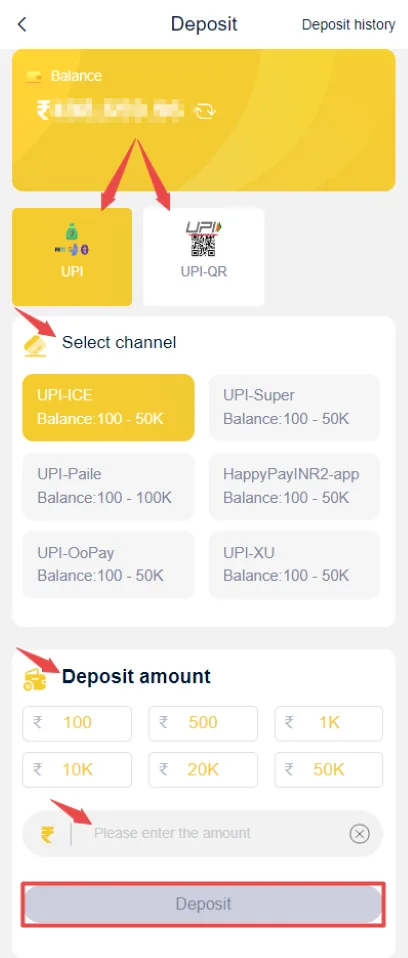
The deposit screen can present UPI or other channels along with visible amount ranges. Choose the channel currently displayed in your account rather than following an old screenshot from another user.
Before paying, confirm the amount, the receiving details and whether the channel has a stated minimum or maximum. After paying, keep the transaction reference until the wallet reflects the credit.
IN999 Game Deposit amount and channel checks
Entering an amount outside the displayed range can cause a failed submission before payment. A payment sent to an outdated destination can be much harder to resolve, so use the details generated in the active deposit screen.
- Open Deposit from the wallet.
- Select the currently available channel.
- Enter an allowed amount.
- Pay using the generated instructions.
- Keep the payment reference until credit appears.
IN999 Game Deposit pending or not credited
Do not immediately pay again. First check your bank/UPI history to confirm whether money actually left the account. If it did, record the reference, amount and time.
Then check the app transaction history. If the payment is still missing after a reasonable processing period, use the in-app service channel and provide only the transaction information needed to locate the payment.
IN999 Game Deposit: avoid deposit scams
Never send money to a personal account because someone in a chat claims they can add balance faster. Never share a UPI PIN or OTP. A payment PIN should be entered only inside the payment app you control.
IN999 Game Deposit status lifecycle: payment sent does not always mean wallet credited
A transaction can move through several states: payment initiated, bank/UPI success, platform matching, wallet credit and final history entry. A delay between bank success and wallet credit is why the payment reference matters.
If the bank shows success but the wallet does not, preserve the reference and wait for the transaction history to update before paying again. If the bank shows failed or reversed, the platform may never receive the money.
IN999 Game Deposit: uTR or transaction reference: your most useful deposit evidence
Keep the UTR/transaction ID, exact amount and time. If support needs to locate a payment, those details are more precise than saying “my balance is missing.”
Do not edit a transaction screenshot in a way that removes the reference. You can mask unrelated balances and personal details while leaving the payment ID visible.
Duplicate payment risk
When a wallet is slow to update, sending the same amount again can create two separate payments and a second problem. Check the first transaction before retrying. If you choose to make another payment later, treat it as a new transaction and keep both references separately.
Wrong channel or outdated payment destination
Use the payment destination generated in the current deposit screen. Do not reuse an old UPI ID or QR from a previous day unless the active screen shows the same destination. Payment routes can change.
If money was sent to an old destination, stop and preserve the bank reference. Do not send another amount to “verify” the route.
IN999 Game Deposit limits and amount formatting
The screen can show minimum/maximum ranges for different channels. Enter an amount inside the displayed range and avoid extra currency symbols or commas if the field expects plain numbers.
IN999 Game Deposit history should match the payment you actually made
Check amount and time, not just a green status. If you made multiple deposits of the same amount, the transaction reference is the safest way to distinguish them.
If the app displays a payment as successful but the usable balance is not updated, record both states before contacting service. If the bank reversed the payment, note the reversal as well.
UPI QR and channel changes
If the app generates a QR or UPI destination, treat it as session-specific information. Do not save a QR and reuse it later unless the current deposit screen still presents the same destination. Payment routing can change.
IN999 Game Deposit: what not to do during a pending deposit
- Do not send the same payment again immediately.
- Do not share the UPI PIN with support.
- Do not delete the bank transaction before recording the reference.
- Do not edit the screenshot so heavily that the reference is unreadable.
- Do not pay a stranger to manually add the balance.
If the amount is outside the channel range
Use a channel whose displayed range includes the amount you intend to deposit. If the field itself blocks submission, choose a permitted amount rather than trying to bypass the form.
IN999 Game Deposit pending vs failed vs reversed
Pending means the transaction has not reached a final state. Failed means the payment or platform action did not complete. Reversed usually means money that was debited is being returned or has returned. Treat these statuses differently when deciding whether another payment is needed.
Wait for the banking record to settle before assuming a failed payment permanently removed money. Banks and UPI systems can show temporary debits that later reverse.
IN999 Game Deposit reference mismatch
If the app asks for a reference/UTR after payment, copy it exactly. A wrong reference can prevent automatic matching even when the amount was paid. Do not substitute the order number from another transaction.
IN999 Game Deposit amount changed by fees
If a payment channel adds a fee, distinguish the amount sent from the amount requested in the app. Keep the final banking record. Do not manually change the expected wallet amount based on assumptions about fees.
Multiple channels: choose the one you can verify
The deposit screen can show several channels with different ranges. Prefer a channel you understand and can document. If one route is unavailable, choose another currently offered route rather than using an old saved payment destination.
After the wallet credits
Check deposit history and usable balance once. Keep the reference until you are confident the credit is final. If the credited amount differs from the expected amount, case that specific difference rather than starting another deposit.
IN999 Game Deposit evidence after a successful wallet credit
Once the wallet reflects the amount, keep the UTR until the deposit history also shows a stable successful record. This gives you both banking-side and account-side evidence if a later balance question appears.
Wrong amount or accidental extra zero
If the bank payment amount differs from what was entered in the deposit form, do not invent a matching reference or submit another payment to compensate. Preserve the real transaction and use the service route with the exact values.
IN999 Game Deposit: payment-app notifications are not the final IN999 status
A UPI notification can confirm a bank-side action; the IN999 deposit history confirms the account-side action. Use both when a case is unclear.
IN999 Game Deposit status should be matched to the payment reference, not guessed from the wallet balance alone
A bank or UPI debit and an IN999 wallet credit are separate records. The useful bridge between them is the transaction reference. Keep the UTR/reference, amount and time together until the wallet updates or the payment reverses.
IN999 Game Deposit status matrix
Keep the reference and wait for the transaction status to settle.
Do not immediately repeat the same payment without checking the bank state.
Match the credited amount to the original transaction.
Treat each debit as a separate reference and timeline.
Frequently asked questions
How do I make an IN999 deposit?
Open the deposit area, choose an available channel, enter an allowed amount and complete the payment using the displayed instructions.
Why is my IN999 deposit pending?
A payment can be pending because of bank/UPI delay, an unmatched reference, network delay or an amount/channel issue.
Should I pay twice if the first deposit is not credited?
No. Check the first transaction status and keep its payment reference before attempting another payment.
What details should I save after paying?
Keep the amount, date/time and transaction reference until the app balance reflects the deposit.
Can deposit channels change?
Yes. UPI, USDT or other displayed choices can change by account, time or availability.
Should I send my UPI PIN to support?
No. A UPI PIN, card PIN, OTP or account password should never be sent to another person.
What if I entered the wrong amount?
Do not guess what will happen. Keep the payment reference and use the in-app support route with the exact transaction details.