
IN999 Game Modes: start with the lobby, then open the round history
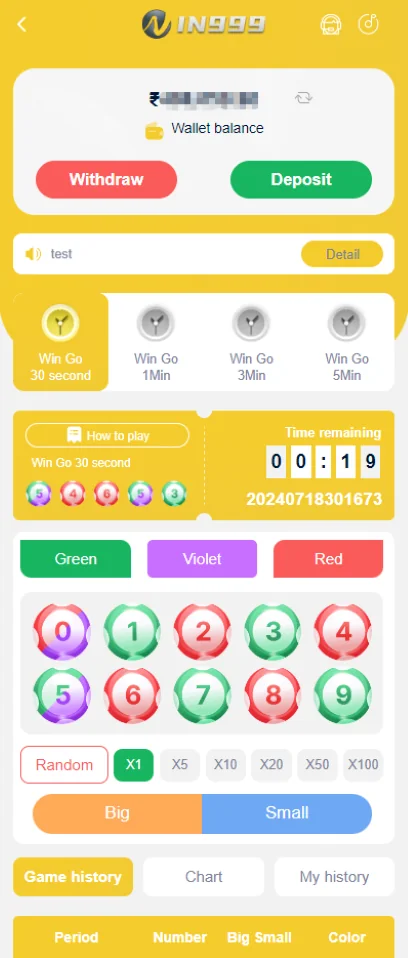
The IN999 screenshots show a mobile lobby with lottery-style categories and a dedicated Wingo-style interface. Each game can have its own period length, number/color options and result history.
The most useful habit is separating the play screen from the history screen. The play screen is where options are selected. The history screen is where completed periods are recorded.
Wingo-style rounds and visible controls
The Wingo-style dashboard shows number buttons, Big/Small choices, color choices, a period timer and game-history tabs. Those controls help you understand the active round but do not provide certainty about the next result.
If a round is almost finished, avoid rushing because a timer or network delay can cause an input to miss the intended period.
IN999 Game Modes: game history: what it can and cannot tell you
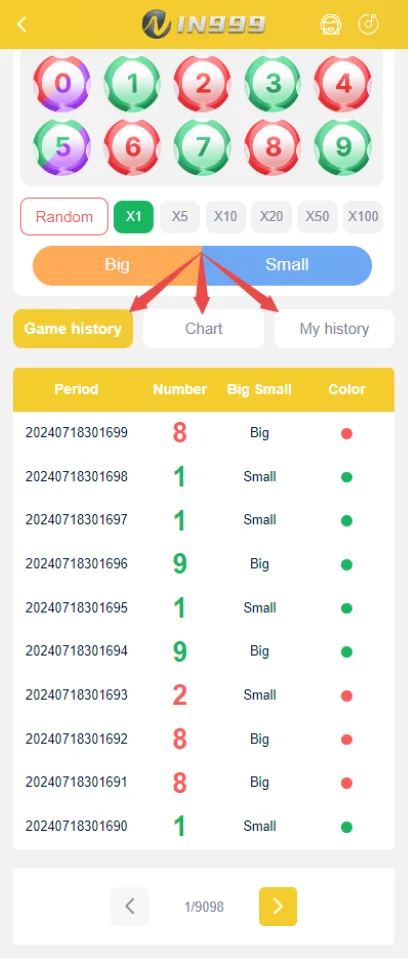
History is useful for verifying a completed period and checking the recorded Big/Small or color outcome. It cannot turn a sequence into a guaranteed next result.
Be skeptical of anyone selling a fixed pattern, bot or prediction that claims certain profit. If you choose to play, set your own limit before opening the round rather than increasing it because of a losing sequence.
K3, 5D and other lobby categories
The app lobby can show multiple lottery-style categories in addition to Wingo. Names and availability may change between versions. Open the active game rules before using real money because the settlement logic may differ from one category to another.
Safer play habits
Use a fixed entertainment budget, stop when that limit is reached and never use borrowed money. Do not treat a streak as proof that the next round must reverse or continue.
Period numbers matter more than screenshots without context
When checking a completed Wingo-style result, record the period number and the visible result together. A screenshot without the period can be misread later or can belong to a different round.
If the timer is close to zero, network delay can make a tap arrive too late for the intended period. Avoid last-second actions when a missed period would cause confusion.
Big/Small and color labels
The interface can group numbers into Big/Small and color categories. Those labels are part of the specific game rules. Do not infer the settlement rule from another platform or from a screenshot of a different game version.
Open the active rules whenever the app changes. A visual design can stay similar while limits, period length or settlement details change.
IN999 Game Modes: using game history responsibly
History can confirm what happened in earlier periods and can help detect whether you are looking at the correct round. It cannot make an independent future event certain. A long sequence does not create a debt that the next round must repay.
If you notice yourself increasing amounts because “the reversal is due,” stop the session. Set a maximum spend before opening the game, not after a losing streak begins.
IN999 game session checklist
- Know the game rules and period length.
- Set a fixed entertainment limit.
- Do not borrow to continue a session.
- Use completed history only as a record.
- Ignore paid signals claiming guaranteed outcomes.
- Stop if network delay makes the round timing unclear.
IN999 Game Modes: game statistics and account records are not the same thing
Game statistics can summarize rounds; account transaction records summarize money movement. If you are checking a balance change, use the transaction record. If you are checking the outcome of a period, use the game history. Keeping those records separate makes disputes easier to understand.
IN999 Game Modes: game History, My History and wallet history serve different purposes
The Wingo-style screen can expose general game history and a personal-history tab. The account center can also expose transaction history. Use the correct record for the question you are asking.
To check a round result, use the period history. To check whether an account action changed money, use the wallet/transaction record. To check your own participation when the app supports it, use the personal-history view.
Round timing and network latency
A countdown is displayed on the client device, but network transmission still takes time. Last-second taps can create disputes about which period received the action. Leave a margin rather than treating zero as the only cutoff.
Do not turn loss recovery into a strategy
Increasing the next amount because the previous round lost can grow risk quickly. A larger next amount does not change the probability of the next result. Set a maximum session spend and stop when it is reached.
Signals, bots and “teacher” claims
Be cautious with people or software promising guaranteed Wingo, K3 or 5D results. A screenshot of past wins is not proof of future prediction accuracy. Do not give account access to a bot or person who says they need the password to place better entries.
IN999 Game Modes: stake multipliers and random controls: understand the interface before tapping
The Wingo-style screen can display multipliers such as X1, X5, X10 and higher. Treat these as stake-size controls, not indicators of probability. Increasing a multiplier raises exposure; it does not make the selected outcome more likely.
A Random control can choose an option for convenience, but it is still a selection tool. It should not be interpreted as a prediction engine.
Period timer and submitted action
Record the period number when timing matters. A device can show a remaining countdown while the network request is still traveling. If a submission happens near the cutoff, check My History or the relevant personal record to see which period accepted it.
Color, number and size categories
Some screens display number buttons and color or Big/Small categories together. Settlement depends on the active rules. Do not assume that every color/number game across different platforms uses identical mapping.
K3 Lottery and 5D Lottery categories
The lobby screenshot shows K3 Lottery and 5D Lottery alongside Wingo. These names can represent different number mechanics and settlement rules. Open the rules inside the selected category rather than applying Wingo rules to K3 or 5D.
Session management after wins as well as losses
Risk can increase after a win because users feel safer raising the next amount. Keep the same predefined limit regardless of recent results. Withdraw or stop based on your plan, not on a feeling that a streak will continue.
IN999 Game Modes: know the difference between game choice and stake size
Selecting a number/color/size is one decision; selecting X1, X5 or another multiplier is another. Do not let a larger multiplier feel like a stronger prediction. It only changes how much is exposed to the same uncertain result.
History length and selective memory
Looking at only the last few favorable rounds can create a false impression. If you review history at all, treat it as a neutral record and avoid selecting only the sequence that supports what you already want to believe.
Stop conditions are part of the session
Set a stop amount and a stop time before play. A session limit that changes every time the result is unfavorable is not a real limit. Leave the app when either condition is reached.
IN999 Game Modes should be read by category, round state and visible history — not by guaranteed-outcome claims
The IN999 games lobby can contain multiple formats with different round timing and interfaces. Use the visible rules, countdown and history for orientation. A prior result does not create certainty for the next round, and third-party “signal” claims should not be treated as proof.
IN999 game-area orientation
Choose a category and confirm you are on the intended account.
Read the timer, available choices and current state before acting.
Use it to confirm recorded outcomes, not to promise the next one.
Check the balance and transaction history separately from game history.
Frequently asked questions
What games are visible in the IN999 app screenshots?
The supplied screens show Wingo, K3 Lottery, 5D Lottery and other lobby categories. Availability can vary by app version.
What does game history show?
Game history records prior periods and visible outcomes. It is useful for checking what happened, not for guaranteeing the next result.
Can past colors or numbers predict the next round?
Past results do not guarantee a future result. Treat history as a record, not certainty.
Where is Wingo in the app?
The lobby and Wingo dashboard screenshots show Wingo-style options and round/history controls.
What are Big and Small options?
Some number/color round interfaces group results into Big/Small categories. The exact rules should be checked in the active game screen.
Can a bot guarantee IN999 results?
No credible tool can guarantee a random or platform-controlled result. Be cautious with paid signals or “sure shot” claims.
Where can I check a completed round?
Use the game history or period-history area shown in the app rather than relying on a screenshot sent by another person.