
IN999 Game Account Help: password, bank details and customer service in one place
Account problems often overlap. A user who cannot log in may need password reset. A user who cannot withdraw may need bank-account correction. A user who sees an unfamiliar transaction may need both a password change and customer-service contact.
That is why these tasks are grouped together rather than treated as unrelated menu items.
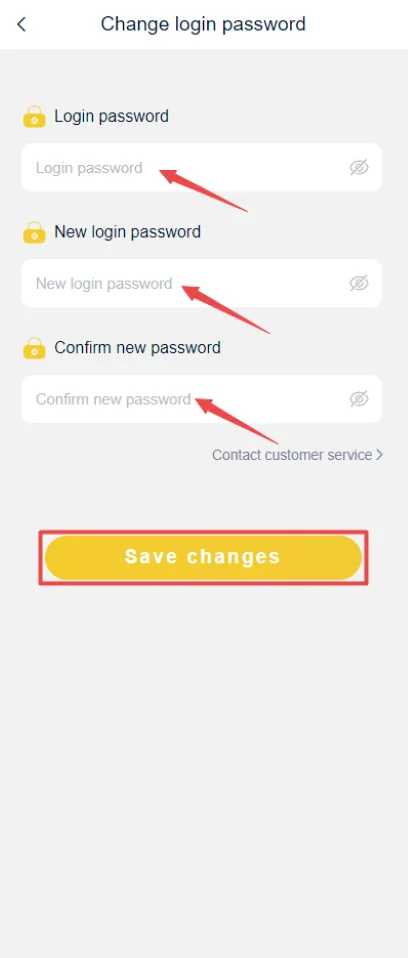
Change IN999 Game Login password
The password-change screen asks for the existing login password, a new login password and confirmation. Use a password that is not reused on other services.
If you cannot remember the existing password, use the forgot-password flow instead of guessing repeatedly.
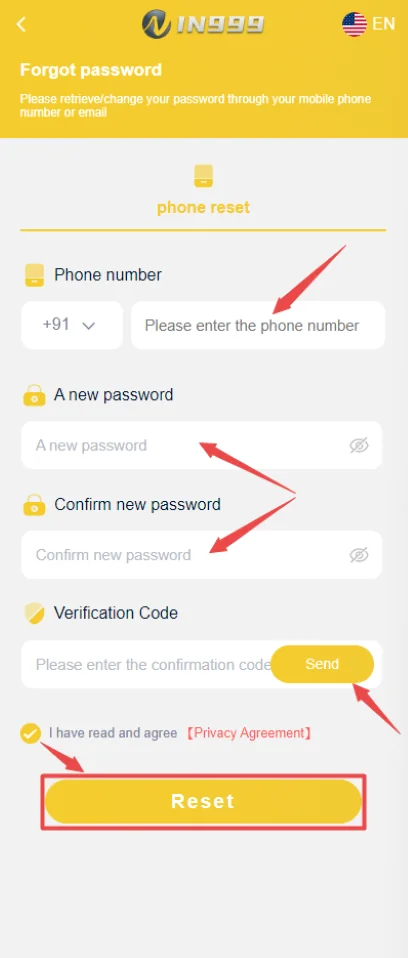
Forgot password and verification code
The reset screen uses the phone number, new password, confirmation and a verification code. Request the code only on the registered phone and never forward it to another person.
Add or correct a bank account
For withdrawals, the bank-account screen asks for bank choice, recipient name, account number, phone and IFSC. Verify the account number and IFSC before saving.
If a wrong account has already been saved, do not keep submitting withdrawals to test it. Use the supported account/service route to correct the destination first.
Customer service and evidence for a problem
When describing a payment problem, provide the transaction amount, time, reference and the status shown in the app. When describing a login problem, provide the error message and registered-number format without sending the password or OTP.
Account recovery matrix: choose the action that matches the problem
| Problem | Best first action |
|---|---|
| Forgot login password | Use phone verification and reset password |
| Know password but login route fails | Check current route/network before resetting |
| Old phone lost | Sign in on controlled device, change password, review account |
| Wrong bank details | Correct linked withdrawal destination before retrying |
| Unknown transaction | Change password, review history, contact in-app service |
IN999 Game Account Help: change password after a suspicious login
If you notice an unknown device session, unexpected account change or transaction you do not recognize, change the password immediately. Then check the linked bank/withdrawal details and transaction history.
Do not wait for another suspicious event before changing a reused password. A password reused on another service can be exposed even if the IN999 app itself was not compromised.
IN999 Game Account Help: bank-account mistakes and withdrawal recovery
A wrong bank account number or IFSC should be corrected before another withdrawal. Preserve the failed/pending transaction reference and use the supported service route if the saved destination cannot be edited directly.
What to redact in screenshots
When sharing an error screenshot, hide full phone numbers, bank account numbers, wallet IDs, OTPs and unrelated balances. Keep the error text, transaction reference or period number visible if those are the details needed to investigate.
Account notifications and service center
Check in-app notifications when a feature changes or a transaction has a status update. The account area can also expose feedback, notifications and customer-service access. Use those controls before trusting contact information from a random post.
Phone-number control is central to recovery
If the account uses mobile verification, keeping access to the registered SIM is one of the most important recovery factors. Before changing your primary number or discarding a SIM, check whether the account offers a supported number-change process.
If the SIM is lost, recover the mobile service through the telecom provider when possible before sending sensitive identity documents to an unknown contact.
Review account settings after a password reset
Check bank details, transaction history, notifications and any agency/referral information. A password reset restores access; it does not automatically verify that no other account setting changed.
Account compromise response
- Change the login password.
- Review recent transactions and withdrawal details.
- Remove or stop using unknown access routes/devices.
- Use in-app service with factual evidence if a transaction is unauthorized.
Change password vs forgot password: choose the correct screen
Use Change Password when you still know the current password and want to replace it. Use Forgot Password when you cannot authenticate with the current password and need phone verification. Using the wrong flow can waste verification attempts.
Verification-code delivery problems
Confirm the registered number and mobile signal. Request a new code once, wait for it and use the most recent code. Rapid repeated requests can make earlier codes invalid and create confusion about which code is current.
Bank details should be treated as security settings
A linked withdrawal account controls where money can be sent. Review it after a suspicious login or device change. If an unknown bank destination appears, change the password and contact service before withdrawing.
Notification checks
Account notifications can contain transaction or system updates. Check them after a pending payment, password change or app update. A notification in your own account is stronger evidence than a forwarded message.
Account cleanup after device loss
On a new controlled device, change the password and review transactions. If the platform offers session/device management, remove the lost device. Also secure the mobile SIM and email account associated with recovery.
Security review after installing on a new phone
Use the new controlled device to sign in, change the password if the old device is lost and inspect wallet history. If the platform exposes notification or device-session information, review it for unexpected activity.
Do not let recovery become social engineering
A person offering to recover an account may ask questions that gradually reveal enough information to take it over. Share only the minimum factual evidence through the in-app service route. Keep OTPs, full bank details and passwords private.
Transaction history as account-ownership context
Knowing your own recent deposit or withdrawal references can help describe the account history without revealing secret credentials. Keep those references privately until old cases are fully resolved.
IN999 account recovery after SIM or phone changes
If the registered SIM is lost or replaced, account recovery becomes more sensitive because verification codes may still depend on that number. Restore control of the mobile number through the telecom provider first when possible. Do not hand account credentials to a stranger who claims they can bypass verification.
IN999 Game Account Help: account security review after a withdrawal-detail change
Changing bank or USDT details is a security event, not just a profile edit. Recheck the destination, change the password if the change was unexpected, and review recent transaction history. If you did not make the change, stop new deposits or withdrawals until the account is secured.
IN999 Game Account Help after an app or route migration
If the interface changes after an update or route migration, verify the account identity before changing security settings. Check the registered number, wallet, linked withdrawal details and recent history. A familiar logo alone is not enough to confirm that the same account state loaded correctly.
IN999 account recovery works best when identity, security and payment details are handled in that order
Start by confirming the registered mobile and regaining account access. Then update the password if needed. Only after the expected account opens should you review bank details, wallet history or other payment settings. Changing payment information while identity is uncertain makes the issue harder to unwind.
Account recovery ladder
- Confirm the registered mobile number.
- Recover or change the password through the account flow.
- Verify wallet and recent history after login.
- Review linked bank or withdrawal details last.
Frequently asked questions
How do I change my IN999 password?
Open the password-change area, enter the existing password and the new password twice, then save the change.
How do I reset a forgotten password?
Use the registered phone number, set a new password and complete the verification-code step shown in the reset screen.
What bank details are needed for withdrawal?
The supplied screen shows bank choice, recipient/account-holder name, account number, phone and IFSC.
Where is IN999 customer service?
The account area includes service-center controls. Use the in-app support route before relying on random chat contacts.
What if I no longer control the registered phone?
Recovery can become difficult without access to the registered number. Use the platform’s supported account-recovery channel and be prepared to verify ownership.
Should I send a full bank screenshot to support?
Share only what is necessary. Mask unrelated balances, OTPs, PINs and sensitive information.
What should I check after a suspected account compromise?
Change the password, review linked bank details, inspect transactions and stop using any unknown access link or device session.