
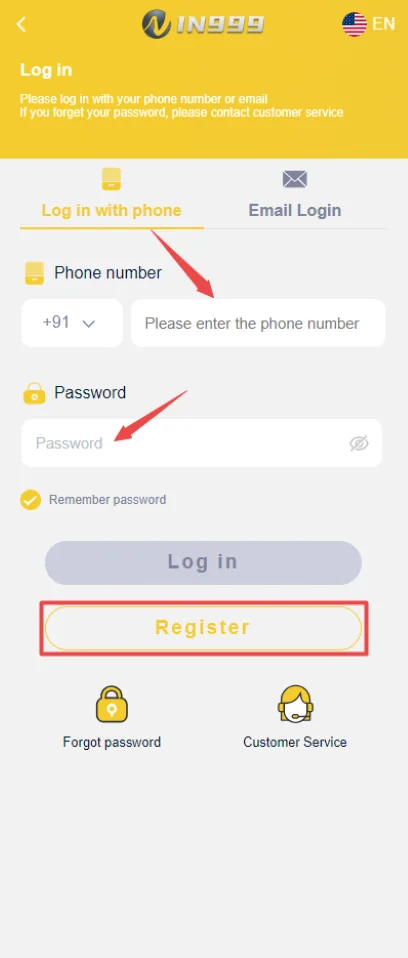
IN999 Game Register: create one account you can recover later
Registration is the point where mobile verification, password security and referral details are tied together. Use a phone number you control long term. That number may later be required for password recovery or account verification.
Avoid creating multiple accounts because a login link changed or a password was forgotten. A clean account history is easier to recover and easier to match with bank details.
IN999 Game Register: mobile registration flow
Open the current registration route, enter the required mobile number, complete the verification step if shown and create a strong password. If an invite code field is present, check the code before submitting because it can connect the new account to a referral relationship.
- Use your own mobile number.
- Complete verification without sharing the code.
- Create a unique password.
- Review invite/referral details before final submission.
IN999 Game Register: after registration: first account setup
Sign in once, confirm that the account opens normally and check the account center. Do not rush into a deposit before you know where transaction history, withdrawal settings and customer-service access are located.
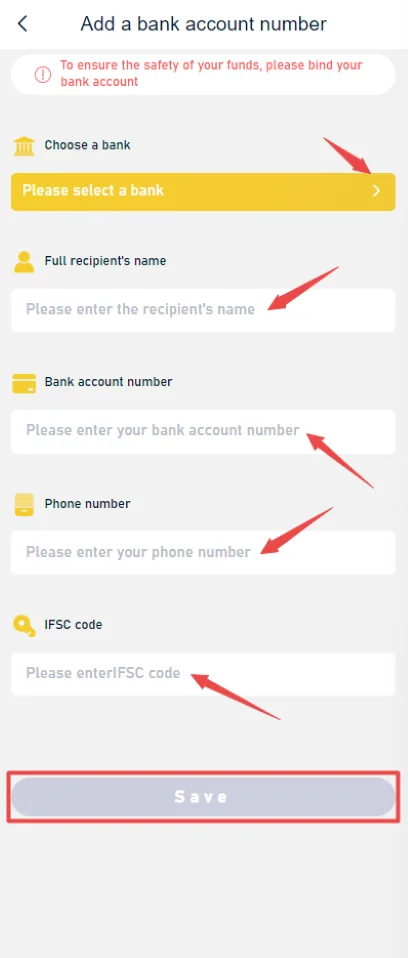
If you plan to withdraw later, add bank details carefully and ensure the account holder information is correct. A typo in a bank account number is a more serious problem than a typo in a display name.
IN999 Game Invite Code and referral relationship
The invitation area in the app can show invitation links, partner rewards, subordinates/data and commission-related sections. Those screens are separate from ordinary login and separate from gift-code redemption.
Do not promise yourself a specific referral amount based on an old screenshot. Reward structures can change by date, account and campaign.
IN999 Game Registration safety checks
Never pay a stranger to register an account for you. Never share the OTP received on your phone. Keep the first password private and change it if the account was set up on a shared device.
IN999 Game Registration errors: solve the field that failed
If registration does not submit, check each field separately. A mobile number can be in the wrong format, a verification code can expire, the two password fields can differ, or an invitation field can contain an invalid value. Fixing the specific field is safer than repeatedly changing every entry.
If a verification code does not arrive, confirm mobile signal and the number before requesting many new codes. Repeated requests can invalidate an earlier code, so always use the latest code received.
IN999 Game Invite Code checks before final registration
If the form shows an invite-code field, confirm the code before submitting. A referral relationship can affect which agency/invitation data appears later. Do not assume the code can be replaced after the account exists.
An invitation code is not the same as a gift code. A gift code belongs to the reward redemption area after login; an invitation code belongs to the registration/referral flow.
The first ten minutes after creating an IN999 account
After registration, sign in once and locate the wallet, transaction history, account settings, security options and service center. You do not need to add funds immediately. Knowing where those controls are makes later troubleshooting much easier.
Then check the password settings and decide whether you need to link a withdrawal destination. If you add bank details, verify the account holder name, account number and IFSC. Do not save guessed details simply to pass through the form.
Duplicate-account risk
Creating another account because you forgot a password can separate old wallet history, referral data and bank details from the new account. Use recovery first. If the platform tells you an account already exists for the mobile number, that is a strong signal to stop registration and use login/password reset.
IN999 Game Registration privacy
Keep screenshots containing the full phone number, verification code or bank data private. If you need help with an error, crop the screenshot to the relevant message rather than posting the entire account screen publicly.
Mobile verification is ownership proof, not a formality
The verification code proves temporary control of the phone number. That is why the code should never be forwarded to another person, even if they claim they are helping with registration.
If registration is being completed on a shared phone, remove saved passwords afterward and make sure the registered SIM remains under your control.
Bank setup can wait until the account is stable
There is no need to enter bank information before you understand the account center. You can first confirm login, locate password recovery and review the withdrawal screen. When you do add a bank account, type the details from a reliable banking source.
IN999 Game Registration reward claims should be checked in the active flow
Historical screenshots or posts can contain sign-up or referral amounts that no longer apply. Treat any number as campaign-specific until the current app shows the same condition. A registration should still make sense even without assuming a particular reward.
IN999 Game Register: before the first deposit
Confirm that you can log out and log back in, that you know the registered number, that the password is stored safely and that the account center opens normally. Those checks are more important than rushing from registration directly into a transaction.
IN999 Game Register + IN999 Game Login flow should be tested before adding funds
After signup, perform one clean logout and login. This verifies that you know the registered identifier and password and that recovery will be possible later. If you cannot log back in, fix that before adding payment details.
Open the account center and confirm where Deposit, Withdraw, Gift, Agency, notifications and service controls are located. Those sections become important once the account is active.
IN999 Game Register: invitation code, registration code and verification code are not interchangeable
An invitation code connects a referral. A verification code proves temporary control of the registered mobile number. A gift code is redeemed after login. Keep these three concepts separate when troubleshooting a signup error.
Never forward the verification code to someone who says they need it to apply an invitation reward. The referral code can be shared; the OTP cannot.
Password rules that reduce later recovery problems
Use a unique password long enough to resist simple guessing and avoid using your phone number, birthday or a short repeated pattern. Store it securely rather than inside a public screenshot or group message.
If the registration form requires password confirmation, type the second value carefully rather than pasting if your clipboard may contain extra spaces.
IN999 Game Registration on a shared or borrowed phone
Clear saved login data afterward and do not leave the account signed in. If the device belongs to another person, avoid saving bank details or passwords in the device device app/password manager.
IN999 Game Register: what to do if the phone number is already registered
Treat that message as an account-recovery signal, not a reason to keep trying new variations. Use Login and Forgot Password with the number you control. If the account is not yours, use the service route rather than trying to take over an existing identity.
IN999 Game Registration form review before the final tap
Pause once before submitting. Read the mobile number, password confirmation and invitation field again. A ten-second review can prevent an account from being tied to the wrong number or referral code.
If the form shows terms or age requirements, read the active conditions rather than relying on an old screenshot. Account access and reward eligibility can depend on current rules.
IN999 Game Register: keep the registered number recoverable
A number used only temporarily can become a long-term recovery problem. Use a SIM you expect to control. If you later change the number, check whether the account offers a supported update process before losing access to the old SIM.
IN999 Game Register: first-login verification
After creating the account, sign in from the same device, check the account center and verify that the registration did not create an unexpected second profile. This is also the best time to confirm the invitation relationship when the agency area exposes it.
IN999 Game Registration should establish one clean account identity
Registration is the point where mobile number, password, verification and optional invite details become connected. Keep the number active and under your control because recovery later depends on the same identity. If an account already exists, use login or password recovery instead of creating another profile simply because an old shortcut stopped working.
Before tapping IN999 Game Register
- MobileUse a number you control and can receive verification on.
- PasswordCreate a unique password not reused on email or banking services.
- Invite fieldConfirm the code before submitting if you intend to use one.
- RecoveryKnow where Forgot Password is before adding funds.
Frequently asked questions
What do I need to register an IN999 account?
Use a mobile number you control, complete any required verification and create a password you can store safely.
Where is an invite code used?
An invite code is normally entered during registration or copied from the agency/invitation area, depending on the active registration flow.
Can I register twice with the same mobile number?
Usually one mobile number should map to one account. If you already registered, use login or password recovery instead.
What should I do immediately after registration?
Confirm the account profile, set a strong password, review security options and add bank/payment details only when you are ready to use them.
Is a gift code entered during registration?
Not necessarily. Gift codes are usually redeemed in a separate reward area after the account exists.
Can registration bonuses change?
Yes. Any reward, amount, eligibility condition or expiry can change. Check the active registration screen before relying on a forwarded claim.
Should I register with another person’s phone?
No. Recovery and verification depend on access to the registered number, so use a number you control.