
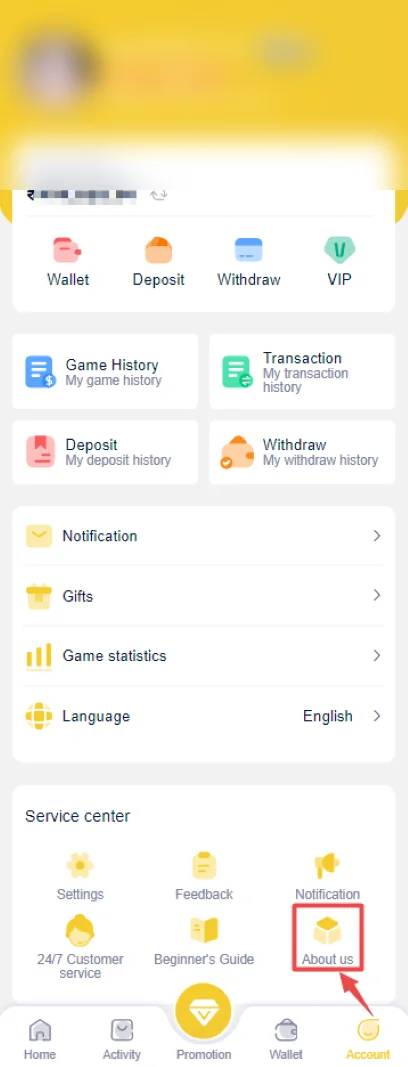
IN999 Game Customer Care: use the in-app service route first
The account screenshots show service-center controls inside the app. That is safer than trusting a phone number or chat handle copied from an unknown post.
For a login issue, send the exact error message. For a payment issue, send the amount, time and transaction reference. Keep passwords, OTPs and payment PINs private.
IN999 Game Support: prepare the right evidence before contacting support
A clear case is easier to investigate. Write down what you expected, what actually happened and the time it occurred. For deposit/withdrawal issues, keep the transaction record. For account issues, note the device and login error.
IN999 Game Support: avoid support impersonation
A fake support contact may ask you to install remote-control software, share an OTP, send a PIN or pay a ‘verification’ fee. Those requests should be treated as high risk.
What to send for each type of IN999 Game Support issue
| Issue | Useful evidence | Never send |
|---|---|---|
| Login | Error text, masked number, device/app version | Password, OTP |
| Deposit | Amount, time, UTR/reference, status | UPI PIN, card PIN |
| Withdrawal | Amount, reference, status, masked destination | Bank OTP, password |
| Game result | Period number, completed history screenshot | Unrelated wallet credentials |
Remote-access and screen-sharing requests
Be extremely cautious if a support contact asks you to install a remote-access app or gives instructions to share full device control. That level of access can expose OTPs, payment apps and passwords.
A legitimate transaction investigation can be described using the transaction reference and status; it does not require another person to control your phone.
Contact-number phrases
Phone numbers copied from posts can become outdated or can be impersonated. Prefer the service-center controls inside the current app/account. If you call any published number, do not treat caller ID alone as proof of identity.
Escalation without exposing secrets
If a case remains unresolved, keep a timeline of prior contacts and transaction references. Repeat the factual details, not the password or OTP. A clear timeline is safer and more useful than giving a support contact broader account access.
Customer service cannot safely solve a problem by asking for control of your money
Support can request identifying transaction details, but it should not require your payment PIN, OTP or password. If someone says a secret code is needed to “verify” the account, stop and use another support route.
Write a timeline for complex payment cases
For a deposit or withdrawal that has gone through several statuses, list the events in order: submitted, bank status, app status, prior support contact and current status. This prevents conflicting details and makes the next support message clearer.
Use masked identifiers
A masked mobile number or bank account can show which account you mean without exposing the full value. Keep the full secret information inside the secure app or banking system.
IN999 Game Support: support case titles that make the problem clear
Use a short factual subject such as “Deposit successful in UPI, wallet not credited” or “Withdrawal pending to linked bank account.” This immediately identifies the system and status involved.
Avoid sending many disconnected messages with different amounts or dates. Keep one case centered on one transaction reference whenever possible.
When a screenshot is useful
A screenshot is useful when it shows the exact error, transaction reference, period number or status. It is not useful when it exposes a password, OTP, PIN or an unrelated full bank statement.
IN999 Game Support: when to stop replying to a support contact
Stop if the person asks for remote access, secret authorization codes, a personal transfer or credentials unrelated to the issue. Return to the in-app service route or another verified contact path.
Close the case only after the account record matches reality
If support says a deposit or withdrawal is resolved, verify the wallet/bank destination yourself. If a login issue is resolved, log out and sign back in once. A message saying “fixed” is not stronger than the account’s actual behavior.
Keep prior case references
If the service center provides a case/reference number, save it with the transaction reference. Reusing the previous case number can prevent the same evidence from being collected again.
IN999 Game Support: privacy during support chats
Crop screenshots to the issue. Do not expose unrelated contacts, full bank statements, OTP notifications or private messages simply because they appear on the same phone screen.
IN999 Game Customer Care number: verify the channel before calling
People often look for an IN999 customer care number when a payment or login issue feels urgent. A phone number copied from a post, comment or forwarded message should not be trusted only because it uses the IN999 name. Prefer the service entry visible inside the account or app when available, and compare the behavior of the contact with the issue you are trying to solve.
A support contact handling a deposit case should ask for a transaction reference, time, amount and masked account context. It should not require your OTP, UPI PIN, full card number or remote access to the phone. If the conversation moves from evidence to secret credentials, stop.
IN999 Game Support: support evidence pack for a faster IN999 case review
- Login: registered mobile with most digits masked, error text, device/app version and time.
- Deposit: amount, UTR/reference, payment time and IN999 wallet status.
- Withdrawal: withdrawal reference, amount, masked destination and current status.
- Gift code: exact code error and whether the code appears in reward history.
- App: install/update version and the screen where loading stops.
Keep one issue per case. Mixing login, deposit and withdrawal complaints into the same message makes it harder to establish a clean timeline.
IN999 customer service after a transaction has multiple references
If the same issue produced more than one payment or withdrawal reference, list them in time order and identify which one is still unresolved. Do not send a collage of unrelated screenshots. A simple timeline makes it easier to match the app record with the bank or UPI record.
IN999 Game Support: what a safe support reply should look like
A useful reply should reference the case, ask for evidence connected to that case, or explain the current status. Be cautious if the conversation suddenly shifts to sending money to a personal account, installing remote-control software, sharing an OTP, or moving the discussion to an unrelated profile.
IN999 Game Customer Care should be treated as a case-resolution channel, not a place to share secret credentials
A useful support conversation is built around a case reference, transaction evidence or exact error message. OTPs, passwords, UPI PINs and remote-control access are not required to describe a login, deposit or withdrawal problem. If a contact insists on those secrets, stop.
IN999 Game Support: support case routing
Error text, mobile masked, time and app state.
Amount, UTR/reference, time and wallet state.
Reference, amount, masked destination and status.
Exact code error and reward-history state.
IN999 Game Support response timeline
- Open one case for one issue. Keep login, deposit and withdrawal problems separate unless they share the same reference.
- Send the minimum useful evidence. Use masked account details, exact error text, transaction reference and time.
- Wait for a case-specific response. A useful response should refer to the issue you opened instead of asking for unrelated credentials.
- Recheck the account state. Close the case only after the login, wallet or transaction history reflects the expected result.
Issue-to-evidence matrix
| Issue | Keep ready | Avoid sharing |
|---|---|---|
| Login | Masked mobile, exact error, time, app state | Password, OTP |
| Deposit | Amount, UTR/reference, time, wallet state | UPI PIN, full banking credentials |
| Withdrawal | Order/reference, amount, time, bank/account state | OTP, card PIN, remote-control access |
| Gift or invite | Code used, result screen, account reward/referral state | Password or payment secrets |
IN999 Game Support: customer service after an app reinstall or phone change
If an account issue starts immediately after reinstalling the app or changing phones, tell support what changed. Include whether the same mobile number is still in use, whether password reset was attempted and whether the account opens on any other device you control. This gives the case a clean starting point without exposing private credentials.
Frequently asked questions
Where should I contact IN999 customer care?
Use the customer-service or service-center area inside the account/app when available.
What should I include for a deposit problem?
Amount, date/time, payment reference and current in-app status are useful. Do not include UPI PINs or OTPs.
What should I include for a withdrawal problem?
Withdrawal amount, time, transaction reference/status and masked destination details can help identify the issue.
Will customer care ask for my password?
Do not share your password or verification OTP with another person.
How do I recognize a fake support contact?
Be cautious if someone asks for secret codes, remote-access apps, upfront fees or payment to a personal account.
Can support speed up every pending transaction?
Processing depends on the actual transaction state. A support contact cannot safely bypass banking or verification rules by asking for secret credentials.