
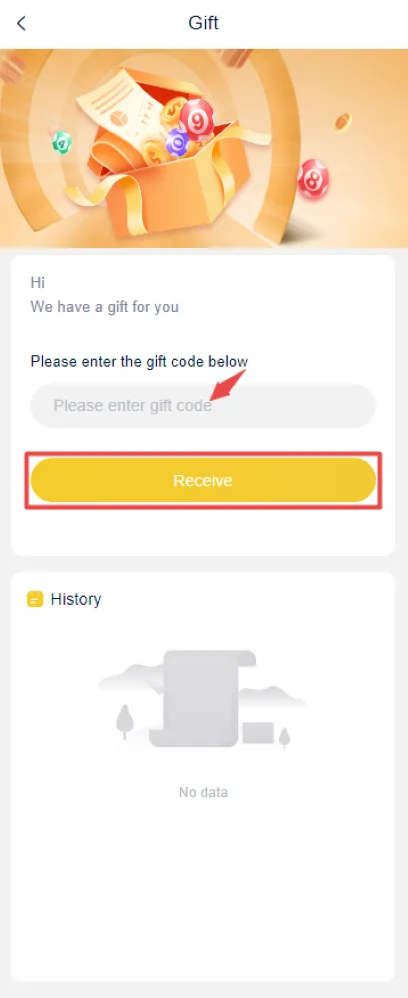
Check the code exactly
Copy the code once from the source you actually received it from. Remove leading or trailing spaces, keep letter case and punctuation exactly as shown, then submit it once. If the same error remains, stop repeating the entry and note the exact on-screen message before checking expiry or account eligibility.
Check prior redemption
The gift history area can show whether a code was already redeemed when history is available.
Do not trust generator tools
A platform must recognize the code; a random generator cannot create valid rewards.
Treat “today” codes as unverified
A reposted code may have expired even if the post is new.
Check whether the code was already used
Gift history can be more useful than trying the same code repeatedly. If a successful redemption is already recorded, another attempt is unlikely to work.
Campaign eligibility can be account-specific
A valid code may still be restricted by date, campaign or account status. A screenshot from another user does not prove the same code is active for you.
Avoid code-generator APKs
Do not install a separate app that asks for login credentials in exchange for “unlimited” codes. Valid codes must be recognized by the platform.
Invalid code
Check the characters, campaign source and whether the code is active for the account.
Already used
Review gift history. A single-use code cannot be made reusable by entering it again.
Accepted but reward not visible
Check reward/wallet history and the campaign condition. Preserve the successful redemption record if support is needed.
Invalid does not always mean fake
A code can fail because it expired, was already used, belongs to another campaign or does not apply to the account. Read the exact error before searching for another code.
Check gift history after every attempt
The reward/gift history can show whether a redemption was recorded. If there is no record and the code field returns an immediate error, focus on spelling, campaign timing and eligibility.
Avoid code generators and paid unlock claims
No external generator can prove that an account is eligible for a reward. Do not pay a fee or share login credentials to receive a “working” code.
IN999 Game Gift Code not working: distinguish invalid, expired and already-used results
Those messages describe different states. “Invalid” can point to characters or campaign mismatch. “Expired” means the active period ended. “Already used” points to account history. Record the exact message before trying another code.
IN999 Game Gift Code success without a visible reward
Check the gift or reward history before retrying. A successful code entry and a credited reward can be separate steps. Preserve the confirmation if the reward does not appear.
Avoid code-generator and copied-list loops
Repeatedly trying random codes from copied lists does not verify that a campaign exists. Use codes tied to an actual current offer or account context, then verify the result inside the reward area.
“IN999 game gift code today” and “free gift code” claims still need account-side verification
A post can use words such as “today” or “free” even when the code belongs to an older campaign. The account reward screen is the useful test. Enter the exact code once, read the result, and check reward history rather than trusting the date printed on a forwarded image.
IN999 Game Gift Code and invite code should not be mixed
An invite code is normally entered during registration, while a gift code is redeemed in a reward area after account access. Putting the right characters into the wrong field can produce an invalid result even when the code itself belongs to a real campaign.
Eligibility can be the missing condition
Some rewards can depend on account age, event participation, deposit conditions or prior use. If a code is recognized but does not credit, review the visible conditions and reward history before assuming the code is broken.
A code list is not the same as a current campaign
Old lists can keep circulating long after the event ends. A current reward should be supported by the active account state, a visible campaign condition or a successful redemption record. If none of those exist, treat the code as unverified rather than repeatedly trying variations.
Keep invite codes, gift codes and login verification codes separate; each belongs to a different account action.
IN999 Game Gift Code error decision tree
Recheck exact characters and campaign source.
Do not keep testing old reposted codes.
Open the account reward history.
Keep the success state and compare the reward record.
Before trying another code
Confirm that the code was entered in the Gift area, not the invitation or login field. Repeated random attempts do not fix account eligibility or an expired campaign.
IN999 Game Gift Code: final gift-code check
After a successful redemption, verify where the reward appears and keep the gift-history entry if available. Do not assume a balance change belongs to the code unless the account record connects the two.
Separate a code error from account eligibility
An IN999 gift code can fail even when the characters are correct. The code itself may be expired, already used or limited to a campaign, while the account may also be outside the eligible group. Treat these as two different checks instead of repeatedly editing the same code.
First preserve the exact code and the message shown after submission. Then check whether the account has already received the related reward, whether the campaign has a date or account condition and whether the code was entered in the Gift area rather than an invite or verification field. Reinstalling the app does not change an expired campaign or an account-level eligibility rule.
If redemption succeeds but the balance looks unchanged, keep the success state and compare the reward history before trying the code again. The useful evidence is the accepted-code result tied to the same account, not a forwarded screenshot showing a reward on someone else’s profile.
Keep the code and result together
When you record a failed or successful attempt, keep the code text, time and result together. That makes it easier to distinguish a typing problem from an account or campaign restriction later.
What a clean IN999 Game Gift Code redemption record looks like
For each code attempt, keep the code text, the time, the account used and the exact response shown by the Gift area. If the message says invalid, expired or already used, record that wording rather than replacing it with a general note such as “not working.” Different responses point to different causes.
If the code is accepted, check the reward or transaction history before testing another one. A successful submission and a visible reward record are stronger evidence than a promotional image or a message saying that a balance should appear later. When the reward history shows no matching entry, keep the success screen and account state together for support instead of repeatedly submitting the code.
Do not mix referral codes, login verification codes and gift codes in the same troubleshooting trail. They belong to different account actions, and a code that is valid in one field can still be rejected in another.
If the same code produces different messages on repeated attempts, keep the earliest response and the later response together. That change can be useful when checking whether the campaign state, account eligibility or reward history changed between attempts. Do not erase the first result simply because a later message looks more specific.
Frequently asked questions
Should I create a new account to fix this?
Usually no. Fix the existing account or transaction problem first.
Should I share an OTP with someone helping me?
No. Keep OTPs, passwords and payment PINs private.
Where should I check the current status?
Use the relevant in-app history or account/service area when available.
Why does an IN999 gift code say already used?
The account may have redeemed that campaign before. Check gift or reward history instead of entering the same code repeatedly.
Can capitalization affect an IN999 gift code?
It can. Copy the code exactly, remove spaces and keep the original character case if the field is case-sensitive.
What if the code says success but I see no reward?
Preserve the success message and check reward history and conditions before retrying or opening a support case.
Can reinstalling the IN999 app make an invalid gift code work?
Usually no. Reinstalling can refresh the app files, but it does not change an expired code, prior redemption or account-level campaign eligibility.